
Mobile charging has become a daily habit for everyone. We charge our phones at home, in the office, in cars, and even at public places. But many users still don’t know that wrong charging habits can slowly damage battery health, reduce backup time, and even cause safety issues. In 2026, smartphones are more powerful than ever, but their batteries still need proper care.
This complete Mobile Charging Guide (2026) will help you understand how mobile charging works, how to charge your phone faster, and how to protect your battery for long-term performance. This article
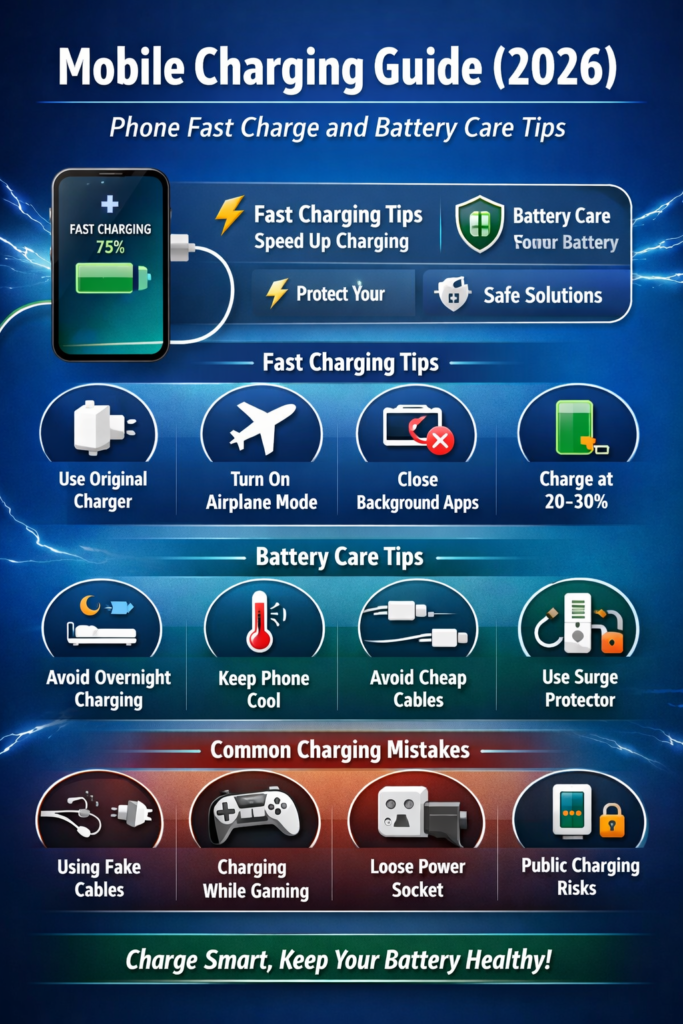
Table of Contents
What Is Mobile Charging?
Mobile charging is the process of supplying electrical energy to your phone’s battery so it can store power and run your device. Charging can be done using:
- Wired charger (adapter + cable)
- Fast charger
- Wireless charger
- Power bank
- Car charger
Modern smartphones use lithium-ion or lithium-polymer batteries, which require smart charging habits to stay healthy.
How Mobile Phone Batteries Work (Simple Explanation)
Lithium-Ion Battery Basics
Lithium-ion batteries store energy through chemical reactions. Every time you charge and discharge your phone, it completes one charging cycle. Over time, these cycles reduce battery capacity.
Why Battery Health Matters
A healthy battery:
- Charges faster
- Lasts longer per charge
- Produces less heat
- Keeps phone performance stable
Poor battery health leads to fast drain, overheating, and slow charging.
Fast Charging Explained (2026 Update)
Fast charging is a technology that delivers higher power (watts) to your phone to reduce charging time.
Common Fast Charging Standards
- USB Power Delivery (PD)
- Qualcomm Quick Charge
- VOOC / Warp Charge
- Super Fast Charging
Is Fast Charging Safe?
Yes, fast charging is safe if you use:
- Original or certified charger
- Good-quality cable
- Proper temperature conditions
Phones in 2026 are smart enough to control power and heat automatically.
- Mobile Hotspot Not Working? Complete Fix Tips for Android
- Mobile Charging Cable – Fast Charging & Durable USB Cable
Step-by-Step: How to Fast Charge Your Phone Safely
Step 1: Use the Original Charger
Always use the charger provided by the phone brand or a certified replacement. Cheap chargers can damage the battery.
Step 2: Enable Airplane Mode
Turning on airplane mode reduces background activity and helps your phone charge faster.
Step 3: Close Background Apps
Close games, social media apps, and video streaming apps while charging.
Step 4: Avoid Phone Usage While Charging
Using your phone during charging increases heat and slows down charging speed.
Step 5: Charge in a Cool Place
Heat is the biggest enemy of battery life. Always charge your phone in a cool, ventilated area.
Best Mobile Charging Tips for Battery Care
Charge Between 20% and 80%
Charging from 20% to 80% is ideal for lithium batteries. Avoid draining to 0% or charging to 100% daily.
Avoid Overnight Charging
Modern phones stop charging at 100%, but keeping the phone plugged in for hours still generates heat.
Remove Phone Case While Charging
Thick phone cases trap heat. Remove them during long charging sessions.
Use Certified Accessories Only
Always buy chargers and cables with safety certifications.
Wireless Charging: Pros and Cons
Advantages
- Cable-free convenience
- Less wear on charging port
- Clean and modern setup
Disadvantages
- Slower than wired charging
- Generates more heat
- Requires precise placement
Wireless charging is best for overnight or desk charging, not emergency fast charging.
Power Bank Charging Tips
- Use a power bank with fast charging support
- Avoid cheap, no-brand power banks
- Do not expose power banks to heat
- Recharge the power bank regularly
A good power bank is safe, reliable, and travel-friendly.
Common Mobile Charging Mistakes to Avoid
Using Fake or Duplicate Chargers
These can cause battery swelling or phone damage.
Charging While Gaming
Gaming during charging produces excessive heat and reduces battery lifespan.
Charging Through Laptop USB Only
Laptop USB ports are slow and inefficient for daily charging.
Ignoring Heating Issues
If your phone gets hot while charging, unplug it immediately.
Public Charging Safety Tips
- Avoid unknown public USB ports
- Use a USB data blocker
- Carry your own charger or power bank
- Never allow data access while charging
Public charging stations can pose security risks.
How to Know If Your Battery Is Getting Weak
Signs of poor battery health:
- Phone drains quickly
- Sudden shutdowns
- Slow charging
- Overheating
If these issues continue, consider battery replacement.
Mobile Charging Myths (Busted)
Myth 1: Charging Overnight Always Damages Battery
Modern phones manage power well, but avoiding overnight charging is still better.
Myth 2: Fast Charging Ruins Battery
False. Certified fast charging is safe.
Myth 3: Closing All Apps Improves Battery Health
Only heavy apps matter. Background system apps are fine.
Best Charging Habits for 2026 Smartphones
- Use fast charging only when needed
- Keep battery between 20%–80%
- Avoid extreme temperatures
- Update phone software regularly
These habits ensure long battery life and better performance.
Frequently Asked Questions (FAQs)
Is it okay to charge my phone twice a day?
Yes, as long as you avoid overheating and overcharging.
Can I use my phone while charging?
It’s better to avoid it, especially for gaming or video streaming.
Which charging method is best?
Wired charging with an original fast charger is the most efficient.
Mobile charging in 2026 is smarter, faster, and safer than ever—but only if you follow the right habits. Using original chargers, avoiding heat, and charging your phone properly can significantly improve battery life and overall performance.
By following the step-by-step mobile charging tips shared in this guide, you can enjoy fast charging, better battery health, and a longer-lasting smartphone. Smart charging today means a healthier phone tomorrow.
Short Warning
Using fake chargers or charging in high heat can permanently damage your phone battery.
Disclaimer
This article is for educational purposes only. Always follow your device manufacturer’s charging guidelines.